Daily use
Scanning
Get a closer look at your oral health. Scans use the Smarthandle 2 camera to capture images of your teeth, and your Oral Health Report appears in the Feno App. Oral Health Reports are included with Feno Plus.
You can start a Scan from the Smarthandle or straight from the Feno App. Scans sync over Wi-Fi or through your phone connection.
Take a Scan on the Smarthandle 2
- From the home screen, press the Upper Button.
- Open your mouth wide when prompted.
- The live camera preview appears on the display. Adjust the angle until your teeth are clearly in view.
-
Press the Upper Button to capture, or the Lower Button to cancel. Hold steady while the display shows Scanning.
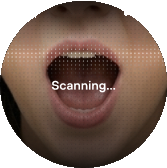
-
Wait while your Scan uploads. The display confirms when it's successful.
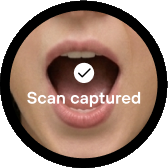
Take a Scan from the Feno App
- Open the Feno App and tap the Scan icon.
- Follow the on-screen prompts.
- Hold steady while it captures. The app confirms when your Scan is successful.
About your Oral Health Report
Your report is created automatically from your Scan images. It is not reviewed by a dentist and is not a diagnosis. Keep up with regular dental check-ups, and see your dental professional if you have any concerns.
If a Scan fails
| Message | What to do |
|---|---|
| Weak connection | Move closer to your router, then try your Scan again.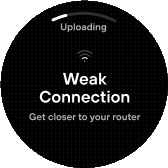 |
| Scan failed | It doesn't retry automatically. Press the Upper Button to try again, or the Lower Button to go home.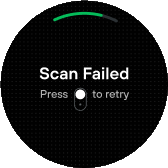 |
| Other error | Restart and try again. If it continues, contact support. |